|
|
Suzuki Swift GTi – MegaSquirt Installation
By Sebastian Giroldi – caaarlo@hotmail.com
San Juan – Argentina.
Rev. 1.4, Sept. 16, 2006.
This guide is intended for readers who already have a working MegaSquirt 1 ECU with a 68HC908 microcontroller and a V2.2 or V3 board. Before proceeding, you should have assembled and tested the ECU, verified communication with the PC, and become familiar with the basic operation of MegaTune. For general MegaSquirt and MegaTune information, visit the MS website at www.megasquirt.info or the MS forums at www.msefi.com, where you can find assembly and testing information.
1. Introduction.
Ever since the MK2 Suzuki Swift GTi was introduced in 1989, I had wanted to own one. In October 1996, I finally bought a brand-new MK3 GTi. Over the years, I upgraded the wheels, tires, and suspension, along with several internal engine components. More substantial modifications eventually followed, including camshafts, cylinder-head work, and a custom exhaust. Those changes made it necessary to adjust the ECU calibration. I purchased the expensive but promising ssgti.com MK3 Stage 2 chip, which seemed to be the only suitable option for my car. I expected a noticeable improvement, but the only difference I observed was an increase in the fuel cut-off threshold to 8600 RPM. The engine still appeared to run lean between 6500 and 8600 RPM, just as it had with the stock chip. The idle speed also remained at 850 RPM, which occasionally caused stalling with the higher-overlap camshafts. Disappointed with the results, I began looking for a better long-term solution, especially because I was considering a future turbocharger project.
After several months of reading Swift forums and reviews of aftermarket chips, standalone ECUs, and piggyback systems, I decided that MegaSquirt offered the best balance of cost and functionality for my needs. It was an experimental, do-it-yourself platform used at the builder's own risk, but my electronics background made the project appealing. The basic kit arrived about 10 days after I ordered it online. I spent another week obtaining the remaining materials and assembled my V2.2 MegaSquirt. The original firmware supported fuel management only, so I downloaded MegaSquirt and Spark Extra (MSnS-E) and reprogrammed the microcontroller. Even then, its wheel decoder could not interpret the unusual reluctor-wheel pattern inside the Swift's distributor. I became so discouraged that I considered modifying the stock reluctor wheel with a grinder to make it compatible. That would have been an irreversible mechanical modification, eliminating the possibility of returning the car to its factory configuration at some point in the future. After a few sleepless nights and several private messages with Baldur Gislason, I found a solution: custom firmware capable of decoding the factory trigger pattern. Understanding the standard code and its wheel decoder took a couple of afternoons. Developing the final custom decoder took a few more days because I had not worked with microcontroller programming in some time. The following sections explain the firmware, software configuration, hardware modifications, and vehicle wiring used in the installation.
2. Firmware changes.
Firmware, or code, is the program stored in the MegaSquirt ECU. It serves a role similar to the program and calibration tables stored in the factory 27c128 or 27c256 EPROM. MegaSquirt uses a Motorola 68HC908 microcontroller, which integrates the processor, RAM, flash ROM, A/D converters, timers, and other peripherals in a single chip. Its firmware is stored in flash memory, the same general type of memory used in memory sticks, multimedia cards, and USB drives. In this installation, the firmware must be replaced with code capable of interpreting the reluctor-wheel signal from the distributor. That signal provides the ECU with a reference for crankshaft position and engine speed. Without a working decoder, the ECU cannot determine whether the engine is turning and will not operate correctly.
Once your MegaSquirt is working and has passed the communication test described at www.megasquirt.info, download the custom firmware to your PC and flash it into the ECU. My firmware is based on MSnS-E 25m1, with changes to the wheel decoder, idle-solenoid control, and temperature-sensor configuration. It is intended only for the stock Suzuki sensor type, idle solenoid, and reluctor wheel.
IMPORTANT: This firmware requires the original Suzuki coolant-temperature sensor and an intake-air-temperature sensor with matching characteristics.
Follow these steps (also explained HERE):
The modified firmware is now installed in the Motorola microcontroller, allowing MegaSquirt to interface with the specified G13B sensors and actuators.
3. Software changes.
I am using MegaTune 2.25b602 beta. Later releases should work provided that msns-extra.ini is replaced with the correct file, as explained below. MegaTune can be downloaded from HERE. Some installations also require additional DLL files, available online; see the MS website and forums for details.
MegaTune installations of that period default to the original B&G 3.0 code and GM-type temperature sensors. To use the custom firmware and Suzuki sensors, update the corresponding configuration files. First, select MSnS-E mode. Installing MegaTune creates a vehicle configuration directory such as c:\Program Files\Megasquirt\car1\MtCfg. Open settings.ini in Notepad and edit it to match the following:
#unset DFI ; David Hooke's Ducati FI
#unset DUAL_TABLE ; Guy Hill and Eric Fahlgren's Dual Table variant
#unset MSNEDIS ; James Murray and Dave Hayne's MSnEDIS ignition variant
#unset MSNS ; Magnus Bjelk's MSnS ignition variant
#set MSNS_EXTRA ; James Murray and Phil
Ringwood's MSnS Extensions
#unset MS_ECU ; Robert Hiebert's EEC-IV replacement code
#unset MS_I ; Bowling and Grippo MegaSquirt
#unset MS_II ; Bowling and Grippo MegaSquirt-II
#unset MSpark ; Tom Hafner's MegaSpark variant
#unset PIC_SQUIRT ; PIC squirt
Next, install the files required for the sensor configuration. In the extracted firmware package, the \25mx\source\ directory contains several .inc files and msns-extra.ini. Copy these files to your MegaTune configuration directory at
C:\Program Files\MegaSquirt\MegaTune2.25bXXX\mtCfg
MegaTune is now configured to communicate with the custom MSnS-E firmware.
4. Hardware changes.
4.1. Bias resistors.
When using the custom firmware with Suzuki temperature sensors, replace the two original bias resistors, R4 and R7, on the V2.2 or V3 board. These are 2490 ohm (2.49K) resistors; replace them with resistors of the same type rated at 2200 ohm (2.2Kohm).
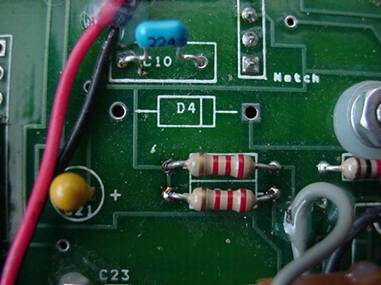
The two 2.2K resistors,
ready for use with the
stock temperature sensors.
4.2. Zero-crossing detector.
The zero-crossing detector conditions the noisy analog signal from the distributor's reluctor pickup and converts it into a signal that the microcontroller can interpret. Reliable signal conditioning can be one of the more challenging parts of a VR-based MegaSquirt installation because of the noise present in the pickup signal.
The V3 board already includes a zero-crossing detector, so you can skip this section, although I have not tested its performance. The V2.2 board requires an external detector and a few changes to its original input circuitry because the ECU will now receive a VR signal instead of a conventional ignition trigger. Disable the original spark-detection path by removing D5. R10, D8, and C12 may also be removed, but removing D5 alone was sufficient in my installation. Remove C11 and replace it with a 1nF ceramic capacitor.
Once those modifications are complete, connect a zero-crossing detector to the board. I tried several circuits; the one that performed best in my car used a National Semiconductor LM1815 with a resistive divider at the input to condition the signal from the magnetic pickup.
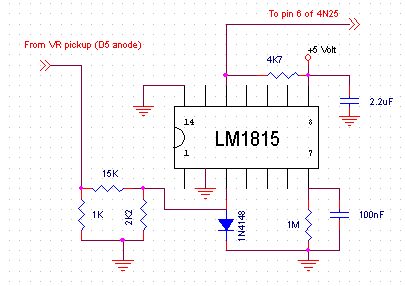
Connect the circuit as follows:
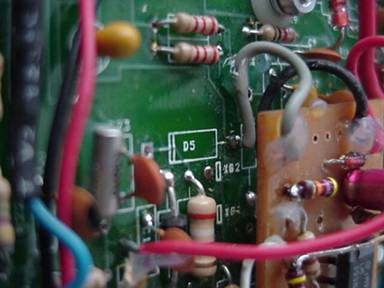
Connect the detector input
to the VR-input point:
the anode pad of the removed D5.
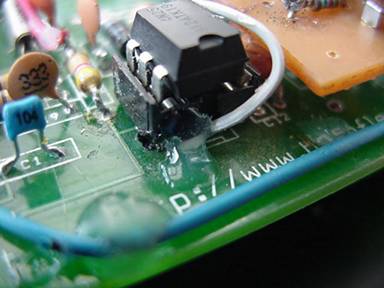
Connect the detector output to pin 6
of the 4N25 optocoupler.
The remaining connections are ground and +5 volts, which are available at several points on the board. I obtained 5 volts from R11 and ground from the anode of D3.
4.3. Idle-solenoid and fuel-pump drivers.
The Swift's idle solenoid has a 25 ohm coil. I made the following modifications to provide sufficient drive current while limiting noise on the 12 volt supply rail.
For the V2.2 board:
Replace R16 (1K) with a 470 ohm resistor of the same type, rated at ¼ W.
Replace Q5 (2n2222) with a ZTX450 or BC639, observing the replacement transistor's pinout.
Optional:
Remove D9 and D7. For each driver, fit a 22V – 1Watt Zener diode between the transistor's collector and emitter, with the cathode connected to the collector and the anode to the emitter. The cathode is identified by the band on the diode body.
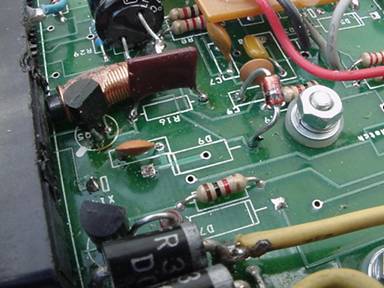
Idle-solenoid driver: D9 removed,
R16 replaced with a 470 ohm resistor,
the transistor replaced with a BC639,
and a Zener diode connected between the collector
and ground (emitter).
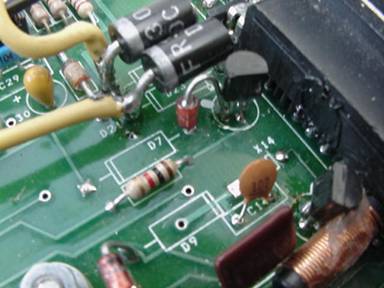
Fuel-pump driver: D7 removed, with a
Zener diode connected between the collector
and ground (emitter).
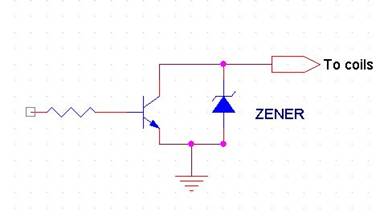
Modified driver circuit, with the
original diodes removed and a Zener diode
connected between the collector
and emitter.
For the V3 board:
Replace R19 with a 470 ohm resistor of the same type, rated at ¼ W.
Replace R39 with a wire jumper.
4.4. Igniter output.
The ignition system generates a spark when the igniter receives a control signal. I use LED 17 for this output on V2.2; the corresponding output on V3 is LED14. Replace the LED with a jumper, or bridge its leads with solder. Route a wire from that point to an available DB37 connector output. I used pin 31 (X14 on V2.2, or IAC2B on V3), although PIN36 is a more suitable choice: it is unused on V2.2 and connects to the IGN pad on V3. Connect this output to the stock igniter. The V3 board also offers an internal IGBT ignition-driver option, but I have not evaluated it. The stock coil and igniter have performed reliably in my installation at speeds of up to 9000 RPM.
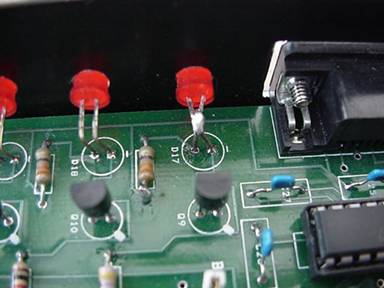
LED 17 with its leads bridged by solder.
A wire runs from either lead
to a spare pin on the DB37 connector.
That pin then connects to the
igniter.
4.5. Filtering flyback switching noise.
Note: If you are using high-impedance or saturated injectors, skip this section.
The flyback board is used with low-impedance or peak-and-hold injectors, which are switched on and off rapidly. During testing, I found that switching noise from this circuitry coupled into the 12 volt supply lines. The resulting voltage disturbances were sometimes large enough to reset MegaSquirt.
I addressed the problem by adding supply filtering and modifying the relevant PCB traces.
Follow these steps:
1- Connect a 100uF, 25 volt electrolytic capacitor in parallel with tantalum capacitor C15 (C16 on the V3 board).
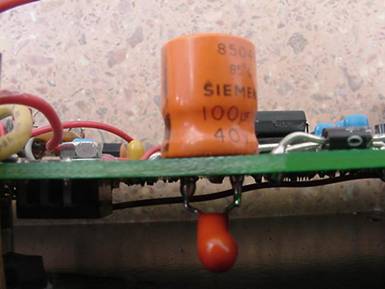
2- Use three additional spare DB37 pins to supply the flyback board with 12 volts, while keeping pin 28 as the supply for the rest of the ECU electronics. This helps accommodate the increased current returned to the 12 volt line by the flyback circuitry. I used X11, X12, and X13.
3- Connect a 470 uF, 25 volt electrolytic capacitor between the auxiliary +12 volt pins and ground, as close to the DB37 connector as possible. FEED THE FLYBACK BOARD FROM THIS POINT.
4- (OPTIONAL) Locate the PCB trace connecting the regulator stage (LM2937, capacitors, and diodes) to the +12 volt supply at DB37 pin 28. Cut this trace with a knife or sharp blade, then reconnect the two ends through an inductor of 5 microhenries or greater. This places the inductor in series between the regulator stage and the 12 volt supply. I made mine from a cylindrical ferrite core wound with 15 turns of 0.3mm copper wire, which was sufficient in my installation.
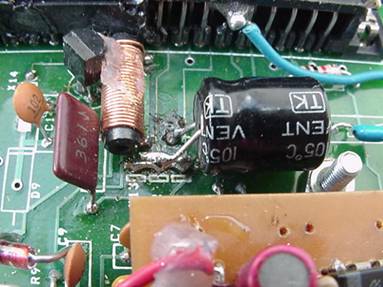
The photo shows X11, X12, and X13
connected together, with the 470uF capacitor.
Beside it is the inductor in series with the
12 volt supply to the regulator stage.
On the V3 board, separating the flyback supply from the rest of MegaSquirt may be difficult because of the multilayer PCB construction. If so, reinforce the 12 volt supply by connecting three spare pins (IAC1A, IAC1B, and IAC2A) in parallel with the existing supply pin, giving four pins in total, and add the two electrolytic capacitors. I did not have a V3 board available to test this variation.
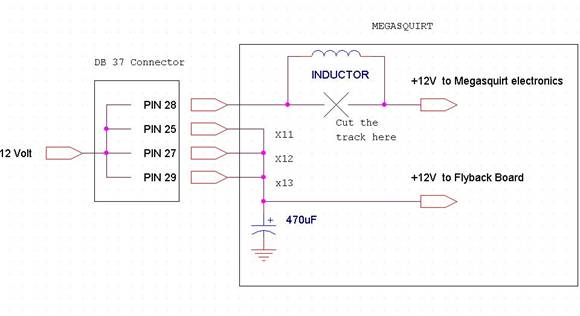
These modifications provide
MegaSquirt with improved
supply-noise filtering.
The 100uF capacitor is not shown,
but it should be connected in
parallel with C15 (V2.2) or
C16 (V3).
5. Connecting MegaSquirt to the Swift.
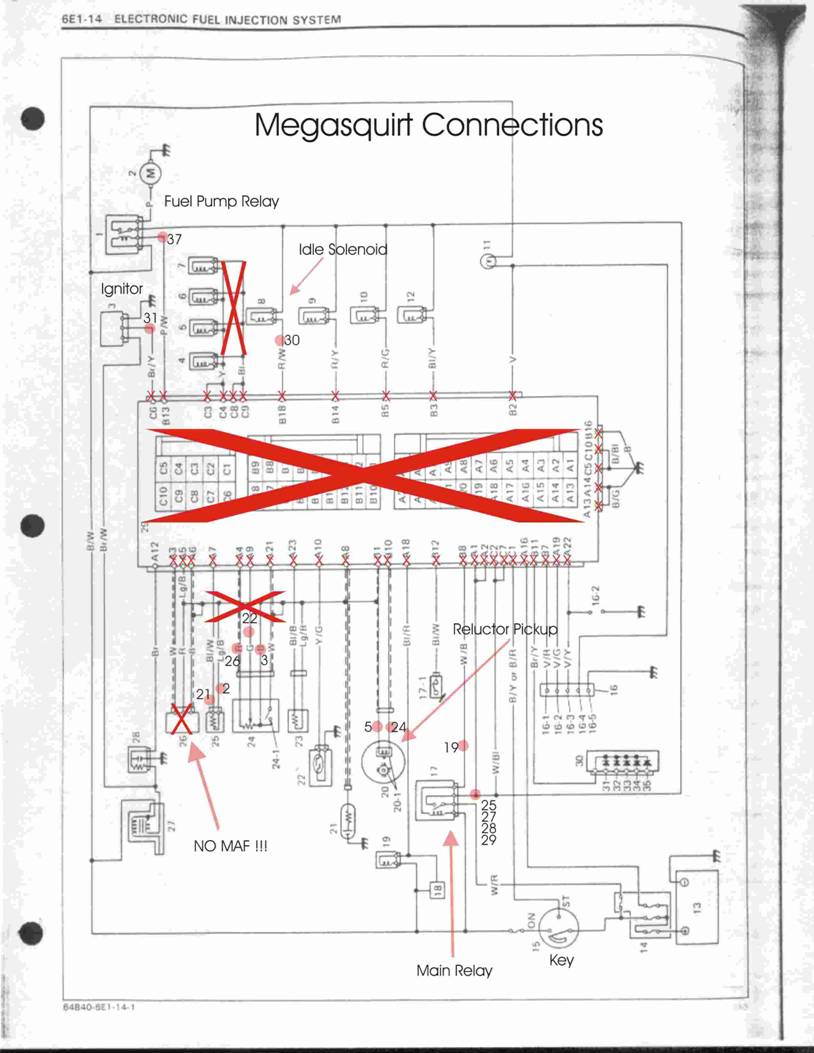
Before starting, disconnect the battery's negative terminal, then unplug the stock ECU. The rest of the factory wiring can remain connected to the vehicle and can be used to connect MegaSquirt. I installed a separate harness while leaving the original wiring in place and connected to the vehicle, but disconnected from the stock ECU, so that I could return to the factory configuration at any time. Retaining the factory wiring does not interfere with MegaSquirt and preserves the existing supply connections for the fuel-pump relay, main relay, and idle solenoid, avoiding the need to run separate wires for them. Use twisted wires for sensor and TPS connections to improve noise immunity. Use shielded cable for the reluctor pickup.
Ground: A reliable ground is essential for MegaSquirt. Use three grounding points rather than just one. I used three ground wires: one for pins 7-8, one for pins 9-10, and one for pin 11; pins 11-12 can also be used because all pins from 1 to 19 are internally connected to ground. My grounding points are on the firewall, as close to MegaSquirt as possible. Use ground wires no smaller than 18 gauge or 1mm2.
12 volt supply: Take 12 volts from the white/blue wire at the main relay, labeled FI in the fuse box beside the battery. Use wire no smaller than 15 AWG or 1.5mm2.
Main-relay ground path: The main relay requires a closed ground path to operate. Connect MegaSquirt pin 19 to the white/black wire at the main relay, using 0.5mm2 wire.
Injectors: Make a new injector harness, or modify the existing one, to form two banks: one for cylinders 1-4 and the other for cylinders 2-3. Supply one side of the injector coils with +12 volts from the main relay's white/blue wire, using 1.5mm2 wire. Connect the other side to MegaSquirt using one 1mm2 wire from pins 32-33 to cylinders 1-4 and another 1mm2 wire from pins 34-35 to cylinders 2-3. See the wiring diagram.
Fuel pump: The fuel-pump relay is beside the main FI relay. Connect pin 37 to the pink/white wire at the FP relay, using AWG22 or 0.35mm2 wire.
Oxygen sensor: I used a 4-wire narrowband sensor with its heater powered from the FP relay. Connect the heater's power wire to the pink 12 volt wire at the FP relay and its ground wire to chassis ground, using 1mm2 wire for each connection.
Positive signal wire: connect to pin 23 (0.35mm2).
Negative signal wire: connect to pin 4 (0.35mm2).
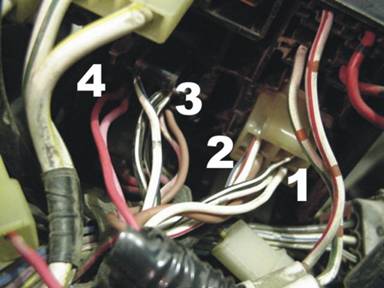
Close-up of the fuse/relay box.
1-White wire soldered to the black/white wire.
This white wire provides the ground path and connects
to pin 19.
2-Brown wire supplying the injectors and MegaSquirt
with 12 volts, soldered to the white/blue wire.
3-Thin brown wire connected to the pink/white wire at
the FP relay. This brown wire connects to pin 37.
4-Red wire connected to the pink wire at the FP relay.
It supplies the O2-sensor heater with 12 volts.
Idle solenoid: Connect pin 30 to the red/white wire at the idle solenoid, using 0.5mm2 wire.

Idle solenoid:
The arrow marks the connection between
the red/white wire and the brown wire
running to MegaSquirt pin 30.
Coolant-temperature sensor: Use the stock sensor. Disconnect it from the factory harness and connect its terminals to pins 21 and 2, using a twisted pair of 0.35mm2 wires.
Intake-air-temperature sensor: Use a compatible sensor. I used a Volkswagen Golf GTi sensor with the same characteristics as the stock coolant-temperature sensor. Connect it to pins 1 and 20, using a 0.35mm2 twisted pair.
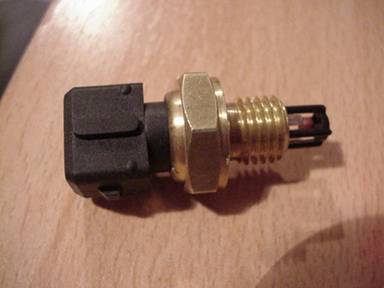
The intake-air-temperature sensor I used came from
a VW Golf GTi and has the same response as the
stock coolant-temperature sensor. It has a Bosch-style
connector, like the fuel injectors. It cost $5.
Throttle-position sensor (TPS): Connect pin 26 to the red wire at the TPS, pin 22 to the yellow or green wire, and pin 3 to the black wire. The idle switch is not used. Use 3 twisted 0.35mm2 wires.
Reluctor pickup: Disconnect the distributor's two wires from the factory harness and connect them to MegaSquirt using shielded cable. Connect pin 24 to the red distributor wire through the center conductor, and pin 5 to the green wire through the shield. RG-174 coaxial cable is an excellent choice, although shielded audio cable can also be used.
Igniter output: The igniter is mounted directly below the ignition coil, on the same bracket, and has 3 wires. Connect the MegaSquirt igniter output (pin 31 or pin 36) to the brown/yellow wire, using 0.5mm2 wire.
Manifold-pressure sensor (MAP sensor): With the stock ECU removed, the original EVAP-canister control is no longer used. The intake manifold's EVAP hose fitting can therefore provide the manifold-pressure signal. Disconnect the hose leading to the canister and connect a hose from that fitting to MegaSquirt.

6. Configuration.
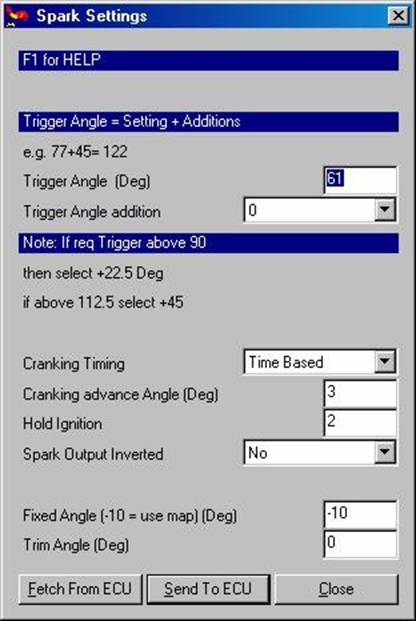
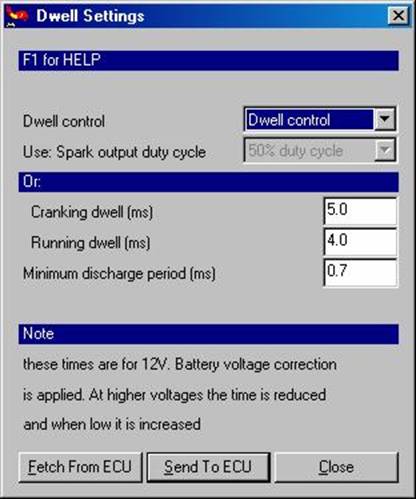
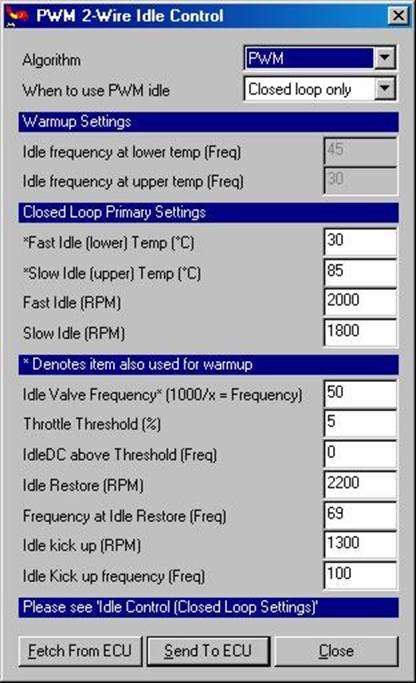
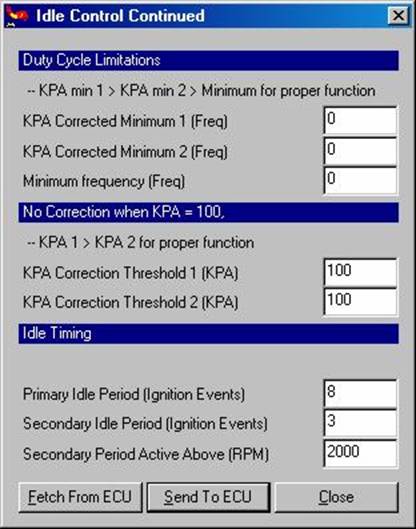
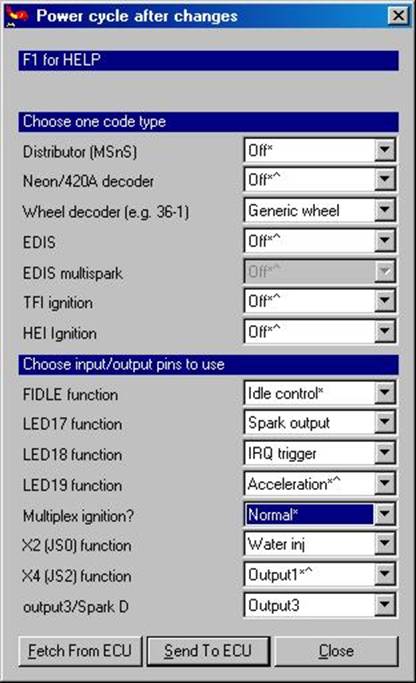
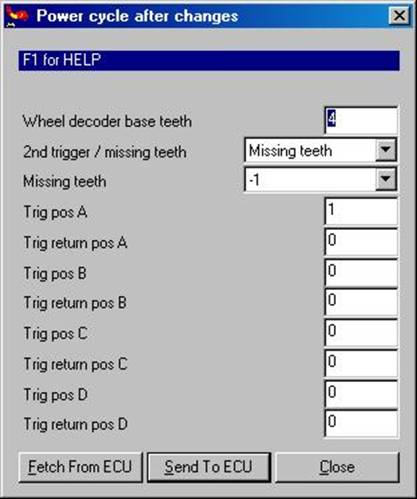
In addition to the basic settings, such as the number of fuel injectors, injection cycles, engine strokes, and cylinders, configure MegaSquirt for the modified hardware outputs and custom wheel decoder. You can download my MSQ configuration file from HERE and load it into MegaSquirt. The following screenshots show the main settings used in this installation.